
One way to manage IIS running on Windows Server 2016 CORE, especially if you are new working with CORE version, is to connect with your CORE IIS server from IIS Manager GUI running in another server (2016 or any other version). But sometimes when you try to connect with your CORE server you get an error message like this one:
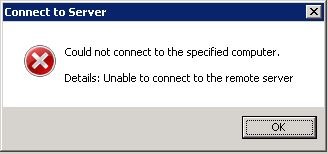
To fix that you need to go to you Windows Server 2016 CORE server and, from PowerShell console, run the following commands:
#Install IIS Management Service feature in your server
DISM /online /enable-feature /featurename:IIS-ManagementService
#Apply a change to your Registry to ensure Remote Management is enabled
Set-ItemProperty -Path “HKLM:\Software\Microsoft\WebManagement\Server” -Name EnableRemoteManagement -Value 1
#Start Web Management Service
Net start wmsvc
 Angel Perez Palacios